Start free
Product updates

What’s new

Everything we’ve shipped, newest first. Built alongside a working repair shop, so it changes every week.

Showing 13 to 18 of 38 updates

October 16, 2026

Improved

Car pictures on the board, and a Full screen button for the Shop TV

Every row and card on the workshop board shows the car, and the picture on the repair order loads much faster. On the Shop TV page, move the mouse or press a key and a Full screen button appears for a few seconds. Press F to switch full screen on and off.
New

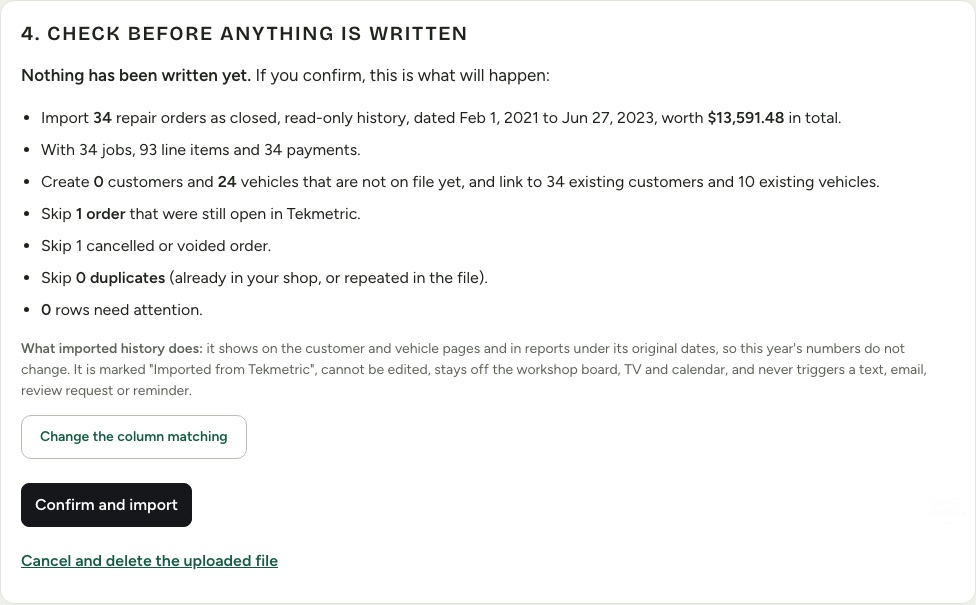
Bring your history with you: import from Tekmetric, Shopmonkey, Shop-Ware and more

Settings, then Import data brings your customers, vehicles, repair order history and inventory over from another shop system, from CSV files. You see a dry run first, with what will be created, linked and skipped, and nothing is written until you confirm. Imported history is read-only and marked with where it came from, stays out of today's numbers, and never sends a text, email or reminder. Every import can be undone. It is included on every plan, and Growth includes free migration help. Open repair orders are skipped by default.

How switching works →
New

Name your AI receptionist and pick its voice

Give your AI receptionist a name like Riley and choose from 8 natural voices, after hearing a sample of each. The greeting can say the name, and each shop sets its own. Find it in Settings, Phone assistant, Your assistant. The recording notice always stays in the greeting.

See the AI receptionist →
New

Shop TV: put your bays on the wall

Pair any TV with a web browser using a 6-digit code and show what is happening in the bays: who is on which job and for how long, what is late, what is waiting on parts or approval, what is ready for pickup, and today's schedule. It is view-only, updates every few seconds and never shows prices, phone numbers or emails. A customer-facing option for the lobby shows only the car, the status and the promised time. Included on every plan.

Read the guide →

October 15, 2026

New

Dark mode for the shop app

Switch between Light, Dark and Auto at the bottom of the sidebar. Auto follows your computer or phone, so the screen is easy on the eyes in a dim bay or an office at night. The car on a repair order even turns its lights on in dark mode. What your customers see does not change: the portal, estimates, invoices and printouts always stay light.

New

AI receptionist for your shop phone

Forward busy, missed and after-hours calls to an AI receptionist that answers as your shop and keeps your own number. It books appointments onto your calendar from your real open times, answers hours, services and your FAQ, takes messages, and gives car status only to callers ringing from the number on file. Every call gets an AI summary, a transcript and a recording kept 14 days, and it texts the caller after the call only if they say yes. A $99/mo per location add-on with 200 minutes, or receptionist-only at $149/mo per location.

See the AI receptionist →